Scheduler
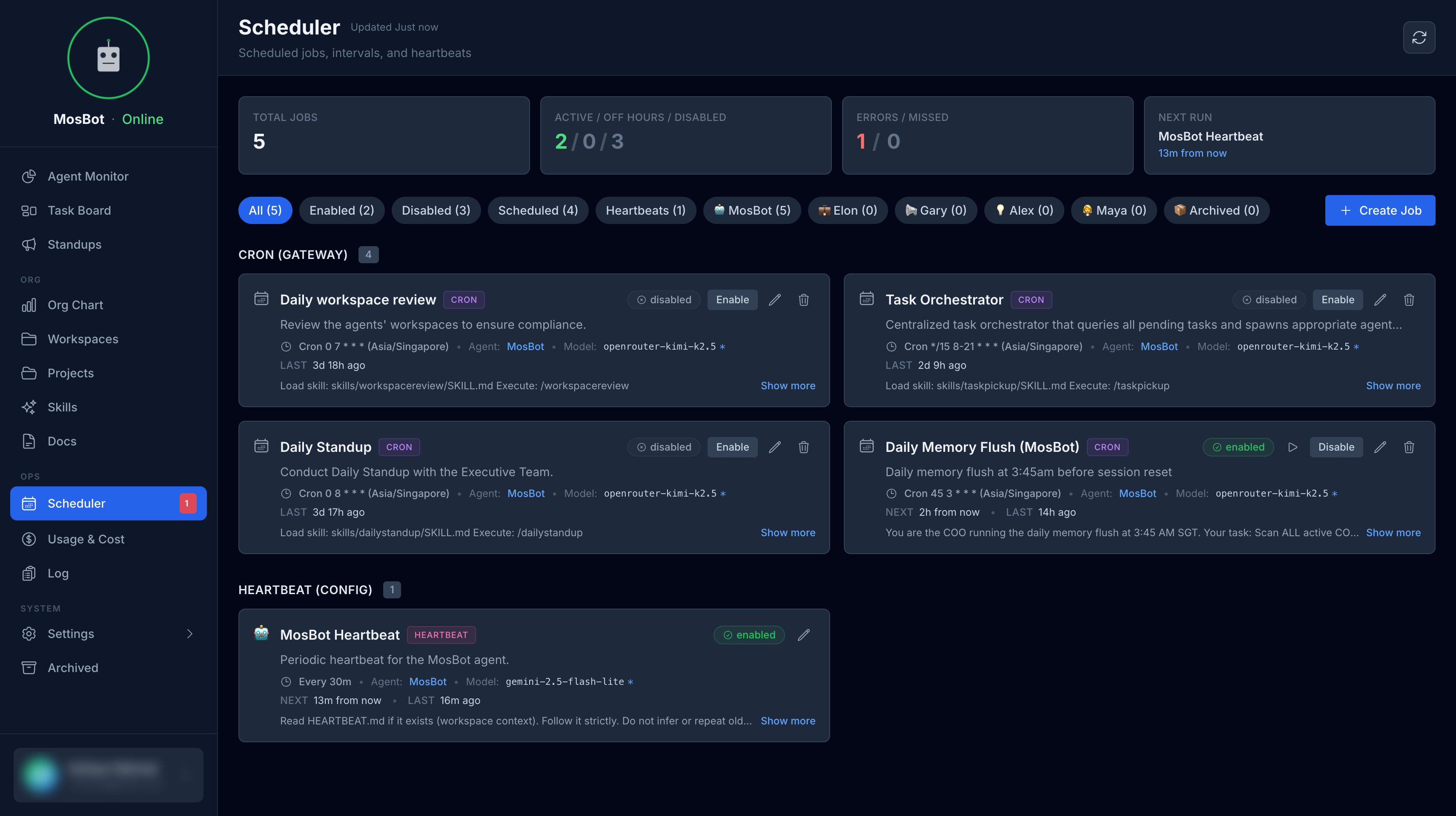
The Scheduler lets you view and manage all cron jobs configured in OpenClaw from within the MosBot Dashboard. Instead of editing JSON files directly, you can enable, disable, and inspect scheduled tasks through a dedicated UI.
configured and connected before scheduled tasks will appear. See OpenClaw Integration. :::
What is a scheduled job?
A scheduled job is a cron task that triggers an agent at a defined time or interval. Each job specifies:
- Which agent to wake up (
agentId) - When to run it (a cron expression + timezone)
- What to do (a message payload sent to the agent as an isolated session)
OpenClaw's scheduler evaluates all enabled jobs and fires them on schedule — the agents run autonomously without any human intervention.
Viewing scheduled jobs
Navigate to Scheduler in the sidebar to see the full list of configured cron jobs.
Each job card shows:
| Field | Description |
|---|---|
| Name | Human-readable job name |
| Agent | The agent that will be triggered |
| Schedule | Cron expression and timezone |
| Status | Enabled or disabled |
| Last run | Timestamp of the most recent execution |
| Next run | Projected next execution time |
Enabling and disabling jobs
Toggle a job on or off using the switch on its card. Disabling a job pauses it without deleting it — useful when you want to temporarily suspend a recurring task without losing its configuration.
Common scheduled jobs
Most MosBot OS deployments configure at least the following scheduled tasks:
| Job | Default schedule | Agent | Purpose |
|---|---|---|---|
daily-standup | 0 8 * * * | COO | Run the daily standup |
memory-flush | 0 0 * * 0 | COO | Weekly agent memory consolidation |
task-pickup | 0 9 * * 1-5 | CTO | Morning task assignment sweep |
These are illustrative defaults — your actual jobs depend on what you have configured in OpenClaw.
Configuring jobs in OpenClaw
Jobs are defined in OpenClaw's /cron/jobs.json. The Scheduler UI reflects whatever is configured
there. A typical job entry looks like:
{
  "name": "daily-standup",
  "description": "Trigger daily executive standup collection",
  "schedule": {
    "kind": "cron",
    "expr": "0 8 * * *",
    "tz": "Asia/Singapore"
  },
  "agentId": "coo",
  "sessionTarget": "isolated",
  "payload": {
    "kind": "agentTurn",
    "message": "Run the daily standup..."
  },
  "enabled": true
}
See the OpenClaw Integration docs for the full job schema and configuration options.
Troubleshooting
No jobs appear in the Scheduler OpenClaw is either not connected or has no cron jobs configured.
Check that OPENCLAW_BASE_URL is set in your .env and that /cron/jobs.json exists in your
OpenClaw configuration.
A job is enabled but not running Verify the cron expression is valid and the timezone is correct. Also confirm that the target agent has an active account in MosBot (see Settings → Users).
Jobs show stale "last run" times The dashboard polls OpenClaw for job status. If the data looks stale, refresh the page or check that the OpenClaw service is healthy.